Debit machines for small businesses in Canada
Moneris debit payment terminal for accepting in-store card payments.

This guide explains how Canadian small businesses can compare debit machine types, terminal costs, Interac Debit fees and buying or renting options.

Key takeaways

  1. Most small businesses will do best with one terminal that handles debit, credit and tap in the same checkout flow.

  2. Terminal cost makes sense only when you compare hardware, monthly charges and card fees against your actual sales pattern.

  3. Connection quality and checkout setup matter as much as price because they shape how payment feels for staff and customers.

Most small businesses should start with one payment terminal that accepts debit, credit and contactless payments.

That choice fits how customers already pay and keeps your checkout simpler to run. Cash accounted for just 18% of point-of-sale transactions in Canada in 2025, according to the Bank of Canada, so card acceptance now shapes the everyday checkout more than cash handling does. A good debit card machine is really a fit question: where you take payment, how often you move and how clearly you can read the fees.

Most small businesses need one terminal for all cards

You don’t need separate machines for debit and credit in most cases.


A single modern terminal will accept domestic debit, major credit cards and tap on one device. That keeps checkout cleaner for staff and customers. It also makes training easier for a small team.

If you run a café or bakery with one till, staff shouldn’t have to ask which machine to grab after every order. One terminal lets them ring up a coffee, pass the device across the counter and finish the sale in one motion. The same logic applies in a clinic, salon or small retail shop. Your checkout feels more consistent when the payment step always works the same way.

Separate hardware only starts to make sense when you keep a spare unit for backup or you’re still working through an older contract. Even then, you’re usually managing around a temporary issue instead of picking the right long-term setup. If your current provider still treats debit and credit like different lanes, ask what a single-device replacement would look like. Most owners will save time first, then sort out the fee details with a clearer head.


Customer tapping phone on Moneris Debit Terminal

The best machine matches your checkout setup

The best debit machine in Canada matches the place and pace of payment in your business. Countertop terminals suit a fixed till with steady traffic. Wireless units suit tables, chairs and curbside handoff. Mobile devices suit businesses that sell away from a permanent counter.

A coffee shop with a fixed front counter usually does best with a terminal that stays put and stays charged. A hair studio where clients pay at the chair needs a unit staff can carry without losing connection. A market vendor needs something that works on cellular data and fits in a small workspace. You’ll feel the difference quickly because staff stop walking back and forth just to finish a payment.

Focus on movement before features. Ask where customers stand, how far staff walk and what happens during your busiest hour. If the answer involves one counter and a steady line, keep the hardware simple. If payment follows the customer, your machine has to follow too or the checkout starts to feel awkward.

Expect terminal costs to follow your sales pattern

A small business will usually see terminal costs in three buckets: hardware, monthly service and processing fees. Buying often means a higher upfront cost and lower long-term hardware expense. Renting lowers the first bill. Your sales pattern decides which structure feels reasonable after a few months.

Most owners will see options that range from low or no upfront cost on a rental to several hundred dollars for a purchased terminal, plus monthly account charges and card processing. About 98 per cent of employer businesses in Canada had fewer than 100 employees in 2023, which is why simple cost structures matter more than enterprise-style bundles for most shops. A florist with steady weekday sales can spread a purchase over constant use. A holiday kiosk will judge the same cost very differently.


Setup

Cost pattern that usually fits

Why it tends to work

One fixed checkout used every day

Buying often feels cleaner over time.

The terminal stays busy enough to justify the upfront spend.

Staff take payment around the floor

A wireless unit is worth the added hardware cost.

The smoother handoff often matters more than the sticker price.

Market stalls or home visits

Mobile hardware with a simple monthly plan keeps budgeting easier.

You need portability first and exact volume is harder to predict.

Seasonal selling for a short run

Renting usually limits upfront spending.

You avoid owning equipment that sits idle for long stretches.

One main till plus occasional extra coverage

Owning one unit and renting a second at peak times can fit.

The daily setup stays efficient without overcommitting on hardware.


Ask for a full monthly estimate before you compare offers. The number that matters is the all-in cost for a normal month at your average ticket size rather than the lowest headline price on the terminal itself. A credit card machine for a small business only feels affordable when the fee structure matches how you sell. That’s the part owners remember after the first statement arrives.

Interac Debit fees usually use a flat transaction charge


Interac Debit fees for merchants usually work as a flat amount per transaction instead of a percentage of the sale.


Credit processing often includes a rate plus a fixed amount. That difference makes debit easier to forecast on lower tickets. You should still read the full schedule for monthly minimums or network charges.

A café that runs lots of 10-dollar and 12-dollar purchases will notice this quickly. If your debit fee is a fixed amount, the cost per sale stays easy to read all month. Credit works differently because a higher ticket usually produces a higher processing charge. That’s why owners often compare fee plans best when they sort transactions by debit volume, average ticket and refund frequency.

Use a simple worksheet before you sign anything. Take last month’s sales, separate debit from credit and apply the proposed fees line by line. A flat debit fee looks good when transactions are frequent and modest. If most of your sales are larger service invoices, the balance between debit and credit pricing matters a lot more than the machine itself.


Customer using a debit card terminal at a small business checkout counter.

Connection reliability decides how often payments fail

Connection type shapes checkout consistency more than many owners expect. A terminal that works well at the front till can struggle on a patio, loading area or market table. You need to test payment spots, not just the office internet. Stable coverage keeps staff focused on the sale instead of the signal.

A wireless terminal can solve a lot of friction when staff move through a room, but only if the signal holds where customers actually pay. A device such as Moneris Go Terminal makes sense for patio tables, curbside pickup and off-site events because it isn’t tied to one counter. That flexibility helps only after you test the far corner of the patio, the front entrance and the spot near the freezer that weakens coverage. Those are the places where checkout either feels smooth or starts to pause.

Run a practical check before your busy period starts. Process test payments in every location where staff will take a card, then watch how long each approval takes. Keep chargers where staff can reach them and make sure receipts still print or send as expected. You’re looking for routine consistency across your payment spots and a setup your staff can trust on a normal day.

Buying works for stable counters with steady volume

Buying a terminal works best when your checkout stays in one place and your volume stays steady month after month. You pay more upfront and then spread that cost over daily use. That setup suits a year-round counter. It also gives you more certainty about hardware expense.

A convenience store with one main till is the clearest example. The terminal sits in the same spot, handles transactions all day and earns its keep through constant use. A purchased unit often feels simpler after the first few months because you’re not still paying for access to hardware you already depend on every day. You also know exactly which machine your staff use and where it lives.

Ownership still comes with responsibilities. You’ll want to ask about warranty terms, software updates and replacement timing before you commit. If your counter setup won’t change and your team already knows the flow, buying can reduce one layer of monthly complexity. That matters most when your checkout routine is already settled and you want the payment piece to stay quiet in the background.


Contactless debit card payment at a Small Business

Renting fits short-term needs with less commitment

Renting a terminal makes sense when you need flexibility more than ownership. A monthly fee keeps upfront cost light and makes short runs easier to budget. That suits seasonal kiosks, event sellers and trial locations. It also helps when you need an extra machine for a short busy stretch.

A garden centre that opens an extra payment station in spring doesn’t always need to own that second device all year. The same goes for a contractor testing card acceptance at job sites or a holiday booth that runs for six weeks. Renting lets you add hardware for the period when it’s useful, then step back without storing idle equipment. That kind of fit is practical, especially when sales volume moves up and down through the year.

Read the rental terms with the same care you’d use for a purchase. Ask how long the agreement runs, what happens if the device needs replacement and how support works during a busy weekend. Shorter commitment feels easier only when the monthly fee, service terms and return process are plain. Clarity is the benefit you’re paying for.

Common terminal mistakes add cost without adding value

Small businesses usually overspend on payment hardware when they buy for edge cases instead of daily routines. Extra terminals, vague fee plans and unused add-ons create clutter at the counter and on your statement. A cleaner setup works better over time. You want a machine that fits your checkout and supports daily use without extra complexity.

These are the mistakes that show up most often once a new terminal is in place:

  • Keeping a fixed counter on a rental plan long after sales have stabilized.

  • Choosing a corded unit when staff collect payment away from the till.

  • Comparing terminal prices without checking the debit card and credit card fee structure.

  • Skipping signal tests in the exact spots where customers tap or insert cards.

  • Paying for extra features that don’t change your checkout routine.

The better purchase is usually the simpler one. If customers pay at one till every day, own the machine and keep the fees easy to read. If payment moves with your staff, keep the device with them and test each selling spot before you commit. Moneris fits this kind of practical planning when the terminal choice, support and fee visibility line up with how a Canadian business actually takes payment.

FAQs

  • The cost of a debit machine depends on whether you buy or rent your terminal, the type of hardware you choose and any monthly service or processing fees that apply. Some rental options have low upfront costs, while purchased terminals require a larger initial investment. When comparing options, look at the total monthly cost of ownership, including hardware, service and transaction fees. Moneris has a range of powerful and wireless terminals that help you accept Interac Debit card, credit card, gift card and digital wallets payments in-store or on the go.

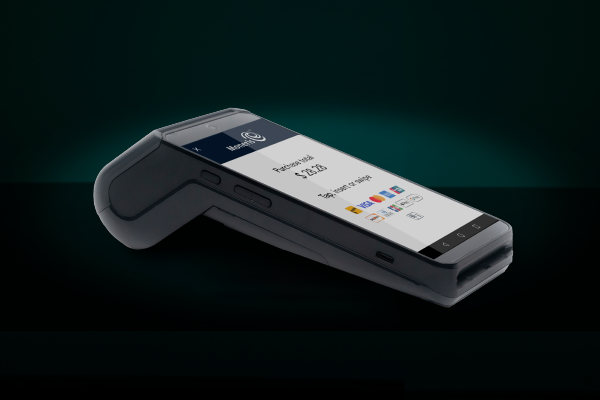
  • The best debit machine for Canadian businesses is the one that fits how your business accepts payments. A countertop terminal may work best for a fixed checkout, while a wireless or mobile terminal may be a better fit if staff take payments at tables, job sites or events. Rather than focusing on features alone, consider where customers pay and how your team uses the device each day.

  • Interac Debit fees are typically charged as a flat fee per debit transaction rather than as a percentage of the sale amount. This can make debit-processing costs easier to predict, especially for businesses with many smaller purchases. However, fee structures vary by provider, so it's important to review all applicable transaction, monthly and network fees before choosing a payment solution.

  • In most cases, no. Modern payment terminals can usually accept debit cards, credit cards and contactless payments such as digital wallets on a single device. Using one terminal can simplify checkout, reduce staff training needs and create a more consistent payment experience for customers.

  • Yes. Renting a debit and credit card terminal can be a practical option for seasonal businesses, event vendors, temporary locations or businesses that want lower upfront costs. Purchasing may make more sense for businesses with a permanent checkout and steady year-round sales. The right choice depends on how often the terminal will be used and how much flexibility your business needs.

Author Profile

Moneris Team

Moneris Team

Moneris is a leading provider of payment processing solutions in Canada. Our blog is your go-to resource for insights into the ever-evolving world of payments. We cover everything from the latest industry trends and technologies to practical advice for businesses of all sizes. Our blog's mission is to spotlight small businesses and provide resources that help them succeed in today's economy. Blog articles are written by members of Moneris' in-house marketing team with support from internal product and industry experts.

Recommended Articles