
TikTok marketing for Canadian small businesses: best practices, posting tips and search strategy
Canadian small businesses are winning on TikTok. Learn what to post, how often, how to get found in TikTok search and why TikTok Shop is not here yet.
Carousels drive more engagement than static posts and Reels
Each swipe counts as interaction, boosting reach
They increase time spent on your content
8–10 slides is the optimal format
Strong hooks + clear CTA = best results
The swipe format that's outperforming everything else on your feed right now.
If your social media strategy is still built around a single photo with a caption, this is a good time to rethink it. Not because what you're doing is wrong, but because there's a format that's consistently outperforming everything else on Instagram and LinkedIn, and it's one a lot of small businesses still aren't using to its full potential.
That format is the carousel. And in 2026, the numbers behind it are hard to ignore.
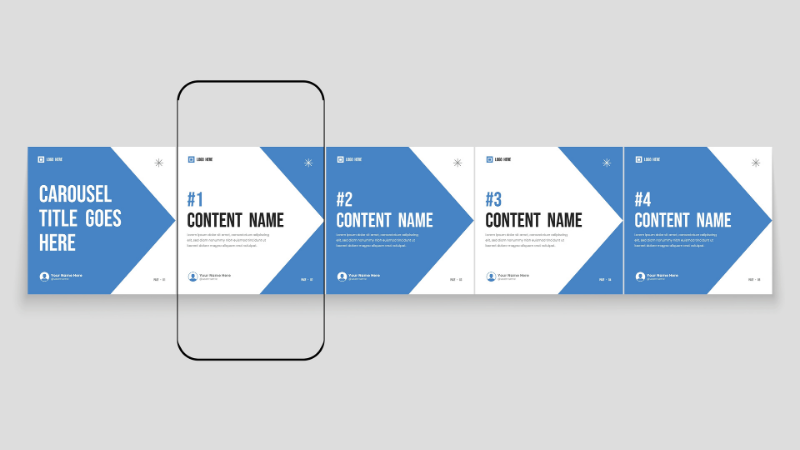
A carousel post is a multi-slide social media format that allows users to swipe through a sequence of images, videos, or graphics within a single post.
The research on carousels this year has been consistent across multiple studies.
According to the Socialinsider 2026 Instagram Organic Benchmarks report, which analyzed 35 million Instagram posts, carousels held the highest engagement rate of any format heading into Q1 2026 at 0.55 per cent. Reels came in at 0.50 per cent, down slightly from the previous quarter. Static images sat at 0.35 per cent, a number that has been declining for years.
Buffer's 2026 analysis of over 52 million posts found that carousels generate 114 per cent more engagement than single-image posts and 12 per cent more than Reels. They also earn 22 to 23 per cent more saves than single photos.
A few other figures worth knowing:
Carousels drive 3.1x more engagement than static posts across platforms
Mixed-media carousels (combining images and short video clips) reach a 2.33 per cent engagement rate, compared to 1.80 per cent for image-only carousels
Carousel ads achieve a 2.5 per cent click-through rate, compared to 1.9 per cent for single-image ads, with up to 30 to 50 per cent lower cost per conversion
On LinkedIn, carousel-format posts hold a 6.80 per cent engagement rate, the highest of any format on the platform
49 per cent of Gen Z prefer carousel posts over static images when browsing Instagram
The data across platforms points in the same direction. Carousels earn more interaction, more saves and better ad performance than static posts.
The performance gap between carousels and static images comes down to a combination of user behaviour and how platform algorithms respond to it.
Every swipe counts as engagement
When someone swipes through your carousel, each slide they advance to registers as an interaction. That tells the algorithm the content is worth showing to more people. A static post gets a like or it doesn't. Carousels accumulate multiple small signals of interest, and those add up.
People spend more time with them
The average person scrolls through their feed at three to four posts per second on mobile. A single image has one chance to stop them. A carousel, once someone starts swiping, creates its own momentum. More time spent means higher dwell time, which platforms use as a signal of content quality.
The second-chance effect
Instagram has a built-in behaviour where it resurfaces a carousel to users who scrolled past the first slide, this time showing them a different slide they haven't seen. Instagram head Adam Mosseri has explained this directly: carousels get a second chance to earn engagement from people who didn't engage the first time. Static posts don't get that. One carousel can generate engagement over several days rather than a few hours.
Saves and shares carry more weight now
Across every major platform, saves and shares grew faster than likes and comments in 2026. Instagram shares were up 12 per cent year over year. Carousels, especially educational ones, earn significantly higher save rates than any other format because people want to come back to them later. A save signals to the algorithm that the content has lasting value.
They build credibility over time
A single photo creates a moment of awareness. A well-built carousel that walks someone through an idea, a process or a useful framework builds actual trust. That's especially valuable for businesses where the relationship with the customer matters as much as the product itself.
Remember when Reels first launched and every piece of advice was "post more Reels"? That wasn't wrong at the time. Reels drove strong reach and the algorithm rewarded them heavily. But the landscape has shifted.
Reels still matter for reaching new people. They generate more impressions and are better for discovery. But the Socialinsider Q1 2026 data shows Reels engagement softening, while carousels have held steady as the top format for actual interaction. Carousels are now where the deeper, more sustained engagement lives.
There's also a useful trick available on Instagram right now: when you add music to a carousel post, Instagram pushes it into the Reels feed algorithm as well as the regular feed. That means you get the broader reach of a Reel combined with the engagement depth of a multi-slide format. Mosseri confirmed this directly, noting that using music on carousels makes them eligible to appear in the Reels tab, which can significantly boost reach.
Think of Reels as the tool for getting discovered and carousels as the tool for getting trusted. In 2026, you want both, but the balance has clearly shifted toward carousels for engagement.
You don't need a big production budget or a design team to make carousels that work. Here's what the research supports.
Make the first slide count
Your first slide does most of the work. Research from Mentionlytics puts roughly 80 per cent of a carousel's total engagement on that opening frame. If it doesn't earn the swipe, the rest doesn't matter. Use bold, high-contrast visuals. Keep the text short, five to ten words. Give people a reason to want to see what comes next.
Some hook approaches that work:
The mistake callout: "3 reasons your Instagram isn't growing (and how to fix it)"
The bold result: "We doubled our client bookings. Here's exactly how."
The direct question: "Struggling to get more than a handful of likes per post?"
The value promise: "Swipe for the 7-step process we use with every new client"
Aim for 8 to 10 slides
Research from UseVisuals and others consistently shows that carousels with eight to ten slides achieve higher engagement, often topping 2 per cent. Engagement does tend to dip around slide three and pick back up at slide eight, when viewers who've committed to swiping reach the end. Fill those slides with useful content and don't stop short just because it feels like a lot.
Instagram expanded the slide limit to 20 in 2024, which gives you room for longer stories when the content calls for it.
Mix in short video clips where you can
If you can add one or two short video slides alongside your static images, do it. Mixed-media carousels earn a meaningfully higher engagement rate than image-only ones. Keep video slides under 15 seconds, add captions (most people watch without sound) and make them loop cleanly if you can.
Remind people to swipe
Only about 5 per cent of carousels include a prompt telling viewers to swipe left, yet adding one nudges engagement rate from roughly 1.83 per cent to 2 per cent. A small arrow or subtle text cue on slide two is enough. It sounds obvious, but it works.
End with one clear call to action
The last slide is not the place to be vague. Tell your audience exactly what to do next. Save the post. Comment a keyword. Visit your link in bio. Tag a friend. Pick one action and make it clear. A carousel without a CTA earns engagement but rarely converts it into anything.
Keep the visual style consistent
Every slide should feel like it belongs to the same post. Use the same colours, the same one or two fonts and a consistent layout. This makes your carousels recognizable in the feed over time. Tools like Canva make this easy. Build a template once and reuse it.
Post when your audience is online
Carousels benefit from early engagement because that first wave of interaction tells the algorithm the content is worth amplifying. Check your Instagram Insights for your audience's most active times and post 30 to 60 minutes before that peak. If you're just starting out, Tuesday through Thursday at 11 a.m., 1 p.m. or 7 p.m. in your local time zone are reasonable starting points.
Use Instagram's per-slide analytics
Instagram now provides a breakdown of engagement per slide. You can see where people drop off, which slides drove the most saves and which hooks got the most swipes. Low swipe-through rate on slide one means the hook needs work. A big drop at slide four means that content isn't earning the next swipe. Use this data to improve future posts.
As social platforms continue to evolve into search-first ecosystems, formats like carousels that provide structured, useful information are becoming even more important.
The sweet spot for Instagram is eight to ten slides, using a 1080 x 1350 pixel portrait format. This fills the most screen space without asking viewers to zoom in. Keep your aspect ratio consistent across all slides — mixing portrait and square creates jarring transitions that hurt completion rates. Add music before posting to push the carousel into the Reels feed for additional reach.
LinkedIn carousels are created by uploading a PDF file that becomes a swipeable post. In Q1 2026, multi-image posts on LinkedIn held a 6.80 per cent engagement rate, making it one of the strongest performing formats on any professional platform. For B2B businesses and service providers, educational LinkedIn carousels built around frameworks, case studies and practical takeaways are delivering strong results right now. Keep the design clean and lead with your most useful point on page one.
TikTok
TikTok's image carousel format has been growing quickly. Image carousels on TikTok generate 81 per cent higher engagement than video posts on the platform. TikTok allows up to 35 slides, and the format works particularly well for educational or trend-based content. If your business is already active on TikTok, this is worth experimenting with.
Organic Facebook reach remains limited for most businesses, but carousel ads perform well, particularly for retargeting and product showcases. The audience on Facebook tends to be older and responds better to simpler, cleaner carousel designs. If you're running Facebook ads, switching from single-image to carousel creative is worth testing.
You don't need a big brand story or a large following to make carousels work. Here are some formats that translate well to everyday business content:
The how-to carousel: Walk your audience through a process step by step. A physiotherapy clinic explaining five stretches for lower back pain. A bookkeeper outlining what documents to gather before tax season. An HVAC company helping homeowners prepare their furnace for a Canadian winter. Educational content like this earns saves consistently.
The before-and-after: For any business where transformation is part of the service — renovations, landscaping, aesthetics, personal training — before-and-after carousels build trust in a way that a single photo never quite can.
The myth-busting carousel: Take five to seven common misconceptions in your industry and address them one by one. This is a natural way to position yourself as knowledgeable without coming across as overly promotional.
The product or service showcase: Show your offering from multiple angles or use cases. A local boutique showing eight ways to style the same piece. A meal prep service walking through five different weekly plan options.
The behind-the-scenes: Show your team, your process, your workspace, your sourcing. People connect with the people behind a business, and carousels give you the room to tell that story properly.
The client results carousel: Walk through how you helped someone. The problem they came in with, what you did, what changed. Social proof in story form tends to land better than a standalone testimonial.
Putting too much text on each slide. Every slide should be readable in a couple of seconds. If someone has to read a paragraph, they'll stop swiping.
Starting with your logo. A logo on slide one will not stop anyone's scroll. Your hook earns the attention, not your branding. Save the logo for a corner watermark.
Skipping the call to action. Engagement without direction rarely leads anywhere. Tell people what to do with what they just read or saw.
Reusing other people's content. Instagram introduced an Originality Score in 2026 that reduces the reach of recycled or borrowed content. Build from your own experience and perspective.
Carousels have consistently been the top-performing organic format on Instagram quarter after quarter, and in 2026 that trend is holding. They earn more engagement, more saves and more trust than static images, and they're increasingly outpacing Reels on the metrics that matter most for building an audience.
For Canadian small and medium-sized businesses, that's a real opportunity. Carousels don't require expensive video production or a large following. They require useful content, a clear structure and the discipline to show up consistently. Start with one topic your customers ask about regularly. Break the answer into eight slides. Make slide one worth swiping on. Give people something worth saving. Tell them what to do at the end.
That's the whole framework. The rest is practice.
__________________________________________________________________________
Sources:
Socialinsider: https://howto.socialinsider.io/en/articles/13915632-february-2026
Buffer: https://buffer.com/resources/state-of-social-media-engagement-2026/
PostNitro: https://postnitro.ai/blog/post/why-carousels-perform-better-than-static-posts
CreatorFlow: https://creatorflow.so/blog/instagram-carousel-posts-guide/
Social Media Today: https://www.socialmediatoday.com/news/report-shows-document-posts-on-linkedin-see-more-engagement/816551/
The Keyword: https://www.thekeyword.co/news/adam-mosseri-carousel-posts-drive-higher-reach-than-single-photo-posts-on-instagram
Planoly: https://www.planoly.com/blog/instagram-carousels-are-making-a-comeback
Carouselli: https://carouselli.com/blog/instagram-carousel-engagement
Mentionlytics: https://www.mentionlytics.com/blog/instagram-carousels/
Storrito: https://storrito.com/resources/how-instagram-carousels-beat-reels-for-engagement-in-2026-and-when-to-use-each/

Canadian small businesses are winning on TikTok. Learn what to post, how often, how to get found in TikTok search and why TikTok Shop is not here yet.

How to choose a restaurant POS system in Canada
A practical guide for Canadian restaurant owners choosing a POS system based on service flow, debit acceptance, online ordering, hardware fit, cost and multi-location needs.

Accessibility requirements Canadian storefronts and websites need to meet
This guide explains AODA compliance, Ontario storefront rules, website accessibility duties and checkout accessibility steps for Canadian small businesses.

Plan a Small Business Month campaign with 8 shop local ideas, from gift card bonuses and loyalty offers to events and customer spotlights.