

Holiday Trends, Retail, Ecommerce
Black Friday vs Boxing Day: Where should Canadian retailers invest?
Compare Black Friday and Boxing Day in Canada and use your store data to plan your holiday retail budget.
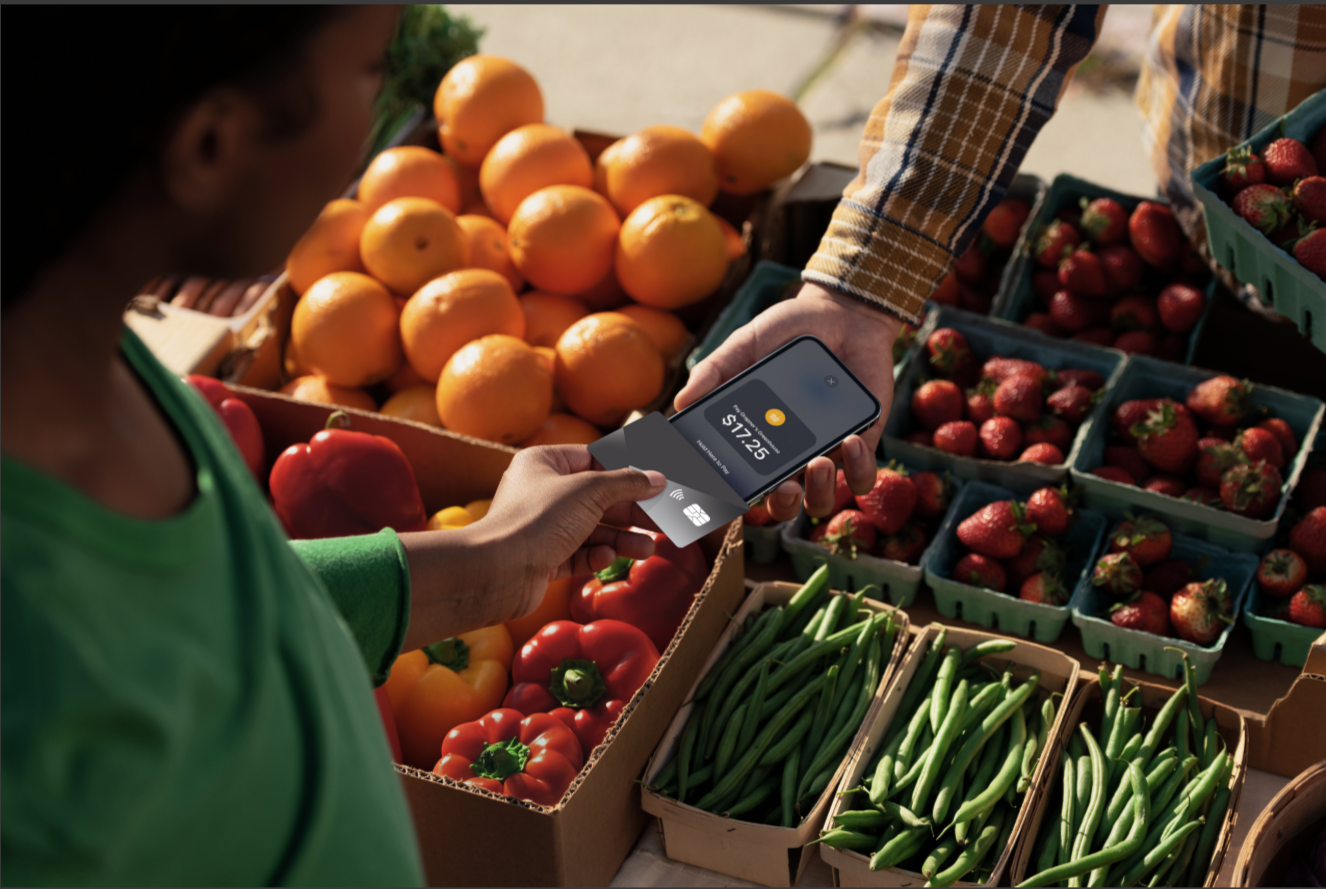
Accepting payments on your phone starts with installing a secure Tap to Pay app on a compatible iPhone or Android device. Once it’s set up, your phone works just like a contactless payment terminal—customers just tap their card or mobile wallet directly on your screen instead of using a separate machine.
Because your phone is connected to a payment processor like Moneris, each tap is encrypted and securely routed for authorization and settlement. After it’s approved, the funds are deposited into your business account just like any other card payment.
This removes the need for dedicated card readers and fixed checkout counters. Best of all, it gives your team a reliable way to accept payments wherever business happens, using a device they already carry every day. Here’s how tap to pay works along with everything you need to know.
When you accept payments on your phone, your device becomes the secure interface that captures the customer’s tap payment. From their perspective, the experience is no different than tapping a traditional terminal, because the same contactless payment networks and authorization process are used behind the scenes.
Your phone itself doesn’t process or hold the funds. Instead, it securely transmits the encrypted payment information to your payment processor, which handles authorization, routes the transaction through the appropriate card networks and settles the funds into your business account. This ensures each payment follows the same path as any other in-person card transaction.
The main difference is the hardware. Instead of relying on a dedicated payment terminal or card reader, your phone serves as the access point to your existing payment infrastructure. This allows you to accept in-person payments using a device you already carry, while maintaining the same security, reliability and processing standards as a traditional terminal.
Tap to Pay follows the same payment flow as a traditional contactless terminal, but your phone serves as the device that captures the transaction. Each step happens securely in the background, from the moment the customer taps to when the funds reach your business account.
Tap to Pay uses your phone’s built-in near field communication (NFC) chip to detect contactless payment methods. When a customer taps their credit card, debit card or mobile wallet against your iPhone or Android device, the phone establishes a secure connection that allows the payment information to be transmitted.
This interaction works the same way as tapping a standard payment terminal, so customers don’t need to learn anything new. The process is fast, familiar and designed for in-person transactions using a physical card, smartphone or smartwatch.
Once the tap is detected, your phone captures the encrypted payment credentials and sends them to your payment processor for authorization. The phone doesn’t store sensitive card information, and the data remains protected throughout the entire process.
Your device acts as a secure interface that passes the transaction to your payment processor’s infrastructure. This ensures each payment is handled according to the same security and compliance standards used by traditional terminals.
After receiving the transaction, your payment processor routes it through the appropriate card network and requests authorization from the customer’s issuing bank. If the bank approves the transaction, the payment is confirmed and added to your settlement balance.
From there, the funds are deposited into your business account according to your processor’s settlement schedule. This follows the same authorization and settlement process used by traditional payment terminals, ensuring consistent and reliable payment acceptance.
Once Tap to Pay is enabled through your payment processor, accepting payments on your phone follows the same basic flow as using a traditional terminal. Here’s what the process looks like in practice:
Download and sign in to the free Moneris Go app: Open the Moneris Go app on your iPhone or Android device and sign in using your merchant account credentials. This authenticates your phone and connects it to your payment processor. Once signed in, your phone is ready to accept payments under your business account.
Enter the transaction amount: When you’re ready to take a payment, enter the purchase amount directly into the app. This prepares the transaction and activates your phone’s contactless payment capability. The screen will prompt you to present your device to the customer.
Have the customer tap their card or wallet: The customer taps their contactless credit card, debit card or mobile wallet against your phone. Your device detects the payment using its built-in NFC chip and securely captures the encrypted payment information. This interaction works the same way as tapping a traditional payment terminal.
Wait for authorization and confirmation: The payment processor sends the transaction for authorization and returns a response within seconds. Once approved, the app displays a confirmation so you and the customer know the transaction is complete. The payment is then added to your normal settlement and reporting flow.
Continue accepting payments as needed: You can immediately begin the next transaction without resetting the device or reconnecting anything. Your phone remains connected to your payment processor, allowing you to accept payments wherever your business operates.
Accepting payments on your phone works much like using a traditional terminal, but without extra hardware. Your phone captures the payment, while your payment processor handles authorization, settlement and reporting in the background. From the customer's perspective, the experience feels the same as tapping any contactless terminal.
Because Tap to Pay uses contactless payments, transaction limits set by the cardholder's bank still apply. Credit card tap limits are often around $250 CAD, while debit limits vary by financial institution. For higher-value purchases, customers will need to use a traditional terminal with chip and PIN, such as Moneris Go Terminal.
Receipts are delivered digitally through your Moneris Go app. You can send them instantly by email or SMS, so there's no need for a receipt printer. All transaction details also remain available through your payment processor's reporting tools.
Tap to Pay works best alongside traditional terminals rather than replacing them entirely. Many businesses use it to support mobile staff, reduce lineups or accept payments away from the counter. This gives your team more flexibility while keeping your existing payment setup intact.
Tap to Pay requires a compatible smartphone that supports contactless payment acceptance. On Android, your device must be running Android 11 or newer and support NFC. On iPhone, Tap to Pay requires at least an iPhone XS running the latest version of iOS, as older models don't support the hardware-level security required for payment acceptance.
This allows standard consumer smartphones to function as secure payment devices without requiring specialized hardware.
Because Tap to Pay uses contactless payment methods, transaction limits set by the cardholder's financial institution still apply. For credit cards in Canada, this limit is typically $250 CAD per transaction when using tap. Debit transactions could be subject to different limits depending on the customer's bank and card settings.
When a transaction exceeds the contactless tap limit, the customer will need to use an alternative payment method. This may include inserting their card into a traditional terminal or using another approved payment option.
For this reason, many businesses use Tap to Pay alongside traditional terminals to ensure they can accept all transaction types without interruption.
“Once Tap to Pay is enabled through your payment processor, accepting payments on your phone follows the same basic flow as using a traditional terminal.”
Tap to Pay expands how and where your business can accept payments, but it doesn’t replace every payment scenario on its own. Understanding when to use Tap to Pay and when to rely on traditional terminals helps ensure your business can support every transaction with confidence.
Tap to Pay works especially well in situations where mobility and flexibility matter. Retail staff can complete transactions on the sales floor, service providers can accept payments at a customer’s location, and businesses operating at markets or events can take payments without bringing dedicated hardware. In these cases, your phone allows you to accept payments wherever the transaction naturally happens.
Traditional terminals still play an important role in supporting the full range of in-person payments. They allow customers to insert their card and enter a PIN for higher-value transactions or when contactless payments aren’t available. Fixed terminals also provide a consistent checkout point in environments where payments are always completed at a counter.
Many businesses use Tap to Pay alongside traditional terminals as part of a complete payment setup. Phones provide flexibility for mobile or on-the-go transactions, while terminals ensure full payment coverage in every scenario. This allows your team to adapt to different situations without being limited to a single device.
Moneris supports both Tap to Pay on iPhone and Tap to Pay on Android, as well as traditional payment terminals designed for countertop, mobile and integrated environments. This gives your business the flexibility to accept payments using the methods that make the most sense for how you operate, while keeping everything connected through the same secure payment infrastructure.
Yes, you can accept payments on an iPhone or Android device by partnering with a payment processor. Your payment processor provides a secure app that connects your phone to your business account and enables Tap to Pay. When a customer taps their card or mobile wallet on your phone, the payment is securely processed and deposited into your business account, minus any applicable processing fees. This allows you to accept payments wherever it makes sense for your business, without relying on a separate card reader or terminal.
Tap to Pay uses your phone’s built-in NFC (Near Field Communication) technology to accept contactless payments from credit cards, debit cards and digital wallets. When a customer taps their card or phone against your device, the NFC chip securely captures the payment information and sends it for authorization. The process works the same way as a traditional contactless terminal, except your iPhone or Android device acts as the payment device. The transaction is encrypted and securely transmitted through your payment provider, so you can accept in-person payments without needing separate hardware.
Yes, accepting payments on your phone is secure when you use Tap to Pay through a trusted payment processor. Tap to Pay uses encryption and tokenization to protect card information during the transaction, and sensitive payment data isn’t stored on your device. Your phone functions as a secure payment interface, while your payment processor handles authorization and settlement through established payment networks. This ensures each transaction meets the same security standards used by traditional payment terminals.

Holiday Trends, Retail, Ecommerce
Compare Black Friday and Boxing Day in Canada and use your store data to plan your holiday retail budget.

Growth Strategies, Small Business, Small Business Month
Get practical insight into Small Business Month in Canada, including October 2026 timing, Small Business Week in Canada and how owners can take part.

Growth Strategies, Retail
A practical guide for small retailers on stock control, reorder points, carrying cost, shrinkage and the role of a POS inventory management system.

Growth Strategies, Small Business
Canadian small businesses are winning on TikTok. Learn what to post, how often, how to get found in TikTok search and why TikTok Shop is not here yet.