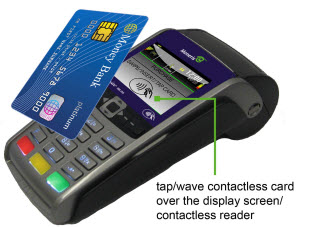
If contactless functionality is enabled, your customers may pay for qualifying purchases by tapping or waving a contactless card over the terminal's contactless reader, which is imbedded behind the display screen.
| Pls translate this text from the image above: | |
| English | French |
| tap/wave contactless card over display screen (contactless reader) | |
1. Wait for the TAP CARD prompt to appear on the screen (usually appears as part of the SWIPE/INSERT/TAP CARD prompt).
2. Tap/wave the card over the screen. For information about using contactless cards (e.g., qualifying amounts, supported transaction types, tips on tapping for best results)...