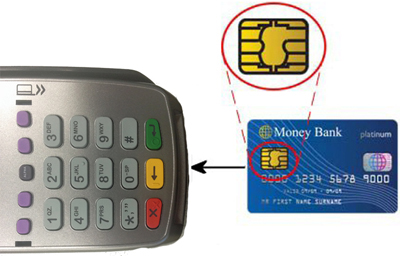
The chip card reader is located in a slot in the front of the terminal. When a chip card is inserted, the chip card reader reads the information on the card's chip (e.g., whether to prompt for PIN or print a signature line on the receipt).
To correctly insert the chip card into the chip card reader:
1. Ensure that:
● the card is facing up
AND
● the chip is closest to chip card reader slot on the terminal.
2. Slide the card into the chip card reader slot until the card stops sliding in.
Inserting a Chip Card in to the Chip Card Reader
IMPORTANT: Leave the chip card in the reader for the entire transaction.
3. When the "Remove Card" prompt appears, pull the card gently out of the chip card reader.